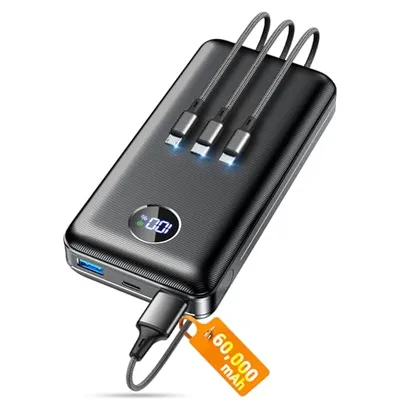
The 'Number and Type of Output Ports' specification delineates the quantitative and qualitative characteristics of interfaces designed for transmitting data or signals from a device or system to external components or networks. This parameter is fundamental in defining a system's connectivity capabilities, interoperability, and potential applications across diverse technological domains, from embedded systems and consumer electronics to high-performance computing and telecommunications infrastructure. It dictates not only how many discrete connections are available but also the specific electrical, optical, or radio-frequency protocols each port supports, influencing factors such as data transfer rates, signal integrity, power delivery, and compatibility with peripheral devices or network topologies.
Understanding the precise configuration of output ports is critical for system architects, hardware engineers, and end-users to ascertain a device's functional scope and integration potential. The enumeration of ports (e.g., one, two, four, sixteen) indicates the potential for concurrent communication or data distribution, while the typology (e.g., USB-A, USB-C, DisplayPort, HDMI, SFP+, Ethernet RJ45, RF coaxial) specifies the underlying transmission standards, physical form factors, and associated performance envelopes. This detailed specification directly impacts network design, peripheral selection, cascading capabilities, and the overall expandability and utility of the host system.
Physical and Electrical Characteristics
The physical dimensions, connector geometry, and electrical signaling standards are primary determinants of output port functionality. For instance, USB Type-A ports commonly support USB 2.0, 3.0, or 3.1 specifications, each offering distinct maximum theoretical data transfer rates (480 Mbps, 5 Gbps, 10 Gbps, respectively) and power delivery capacities. USB Type-C, conversely, is a reversible connector that can implement various USB protocols (up to USB 4.0, 80 Gbps) and also carries alternative modes such as DisplayPort Alternate Mode (DP Alt Mode) or Thunderbolt, enabling high-resolution video output and high-speed peripheral connectivity over a single cable. Ethernet ports, typically RJ45 connectors, adhere to IEEE 802.3 standards, with common variants including Gigabit Ethernet (1000BASE-T), 10 Gigabit Ethernet (10GBASE-T), and higher speeds like 25GBASE-T, 40GBASE-T, and 100GBASE-T, differing in cable requirements and maximum segment lengths.
Optical Output Ports
Optical output ports, prevalent in telecommunications and high-speed networking, utilize fiber optic cables to transmit data via light pulses. Key types include SFP (Small Form-Factor Pluggable) and SFP+ modules, which are hot-swappable transceivers supporting various optical interfaces (e.g., 1000BASE-SX, 1000BASE-LX for SFP; 10GBASE-SR, 10GBASE-LR for SFP+) over different fiber types (multimode or single-mode) and distances. QSFP (Quad Small Form-Factor Pluggable) and QSFP+ modules offer higher bandwidth by supporting multiple optical lanes, commonly used for 40 Gbps and 100 Gbps Ethernet links.
Wireless Output Capabilities
While not strictly physical ports, wireless communication interfaces such as Wi-Fi (IEEE 802.11 standards) and Bluetooth represent critical output mechanisms for data transmission. These interfaces are characterized by their supported protocols (e.g., Wi-Fi 6/6E, Bluetooth 5.0/5.2), frequency bands (2.4 GHz, 5 GHz, 6 GHz), and maximum achievable data rates, enabling untethered connectivity to networks and peripheral devices.
Industry Standards and Protocols
The interoperability and functionality of output ports are governed by a complex ecosystem of industry standards and protocols developed by organizations like the IEEE, USB Implementers Forum (USB-IF), VESA, and various telecommunications bodies. These standards define electrical signaling characteristics, data encoding schemes, physical connector specifications, and communication handshaking procedures. Adherence to these standards ensures that devices from different manufacturers can communicate effectively. For example, DisplayPort standards (e.g., DP 1.4, DP 2.0) define high-bandwidth, digital audio/video interfaces essential for monitors and graphics cards, specifying features like HBR (High Bit Rate) modes and DSC (Display Stream Compression).
| Port Type | Common Standard | Max Data Rate (Theoretical) | Primary Use Case |
|---|---|---|---|
| USB 3.2 Gen 1 Type-A | USB 3.0 | 5 Gbps | Peripheral connectivity, data storage |
| USB 3.2 Gen 2x2 Type-C | USB 3.2 | 20 Gbps | High-speed peripherals, external storage, charging |
| HDMI 2.1 | HDMI Forum | 48 Gbps | Digital audio/video transmission for displays |
| DisplayPort 2.0 | VESA | 80 Gbps | High-resolution video output for monitors |
| RJ45 (10GBASE-T) | IEEE 802.3an | 10 Gbps | High-speed wired networking |
| SFP+ | SFF Committee | 10 Gbps | Fiber optic networking, server interconnects |
| Thunderbolt 4 | Intel/Apple | 40 Gbps | High-speed data, video, and power delivery |
Applications and Use Cases
The number and type of output ports are defining characteristics across a vast spectrum of electronic devices. In personal computers, the array of USB ports, HDMI/DisplayPort outputs, and Ethernet jacks dictates the ability to connect monitors, storage devices, input peripherals, and network infrastructure. For network-attached storage (NAS) devices, multiple high-speed Ethernet ports (often supporting link aggregation) are crucial for throughput and redundancy. Mobile devices typically feature fewer, more generalized ports like USB-C, which handles charging, data transfer, and display output. Embedded systems and single-board computers may offer a minimal set of GPIO (General-Purpose Input/Output) pins, UART, SPI, or I2C interfaces for control and sensor integration, reflecting their specific application requirements.
Performance Metrics and Considerations
Key performance metrics associated with output ports include maximum bandwidth (data throughput), latency, signal integrity, power delivery capacity, and physical connector durability. Bandwidth is often the most cited metric, indicating the theoretical maximum data transfer rate. However, real-world performance can be affected by factors such as protocol overhead, cable quality, interference, and the capabilities of the connected device. Latency is critical for real-time applications like gaming or industrial control, where minimal delay between signal transmission and reception is paramount. Signal integrity ensures that data is transmitted accurately without excessive errors, influenced by impedance matching, shielding, and clocking precision. Power delivery, especially via USB Power Delivery (USB PD) or Thunderbolt, enables devices to be powered or charged through the same port used for data transmission, simplifying cable management and system design.
Evolution and Future Trends
The evolution of output port technology has been driven by the relentless demand for higher bandwidth, lower latency, increased power delivery, and greater versatility. Early serial and parallel ports have given way to high-speed serial interfaces like USB and Thunderbolt, which offer significantly greater performance and integrate multiple functionalities. The trend towards USB-C as a universal connector signifies a move towards standardization and simplification. Future developments are likely to focus on further increasing data rates (e.g., USB 4.1, Thunderbolt 5), improving power efficiency, enhancing security features within the port protocols, and potentially integrating optical technologies more directly into consumer devices for extremely high-speed connectivity.