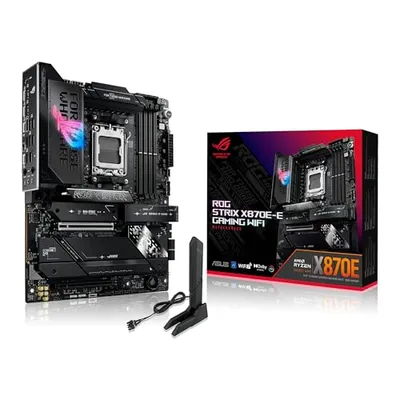
The 'Fourth M.2 Slot' is a designation that implicitly refers to a subsequent or additional M.2 interface slot implemented on a computing motherboard, typically representing the fourth physical slot available for an M.2 Solid State Drive (SSD) or other M.2 form-factor peripherals. Its functional characteristics are dictated by the underlying chipset, CPU, and PCIe lane allocation, which determine its connection type (e.g., PCIe x2, PCIe x4, SATA) and supported protocol (e.g., NVMe, AHCI). The precise bandwidth and performance capabilities of a fourth M.2 slot are contingent upon the platform's architecture, including whether it shares bandwidth with other peripherals or has dedicated lanes. Understanding the specific implementation, such as its PCIe generation (e.g., PCIe 3.0, 4.0, 5.0) and the number of lanes it utilizes, is critical for maximizing storage performance and system responsiveness.
The strategic placement and configuration of multiple M.2 slots, including a fourth instance, are increasingly important in high-performance computing, server environments, and enthusiast-grade desktop systems where demand for high-speed, low-latency storage solutions is paramount. Motherboard manufacturers differentiate their products by offering varying numbers of M.2 slots, often with different performance tiers, physical lengths (e.g., 2242, 2260, 2280, 22110), and cooling solutions. The advent of NVMe over PCIe has amplified the importance of these slots, enabling SSDs to achieve throughputs far exceeding traditional SATA interfaces, thus making the designation of a fourth M.2 slot a signifier of enhanced storage expandability and potential performance capabilities within a system's architecture.
M.2 Interface Fundamentals
The M.2 form factor, formerly known as the Next Generation Form Factor (NGFF), is a specification that defines a standard for interfacing both internal computer components such as solid-state drives (SSDs) and wireless network cards with a host computer. M.2 slots are characterized by their physical connector, which supports various bus interfaces including PCI Express (PCIe), Serial ATA (SATA), and USB. The keying of the M.2 slot (e.g., B-key, M-key, B+M key) dictates the types of interfaces and form factors it can accommodate. For storage devices, M-key slots are typically associated with PCIe x4 interfaces, enabling NVMe protocol support for maximum throughput, while B-key and B+M key slots might support SATA or PCIe x2 connections.
PCIe Lane Allocation and Bandwidth
The performance of any M.2 slot, including a fourth instance, is fundamentally limited by the number of PCI Express lanes it is connected to and the PCIe generation. A PCIe 3.0 x4 connection provides approximately 3.94 GB/s of bidirectional bandwidth, while a PCIe 4.0 x4 connection doubles this to approximately 7.88 GB/s, and PCIe 5.0 x4 further escalates to about 15.75 GB/s. Motherboards employ various strategies for M.2 slot lane allocation. Some slots may derive their lanes directly from the CPU, offering the highest potential performance and lowest latency. Others may connect through the chipset, which can introduce latency and potentially share bandwidth with other chipset-connected devices like USB ports or additional SATA ports. The presence of a fourth M.2 slot often implies a higher-end motherboard with more robust PCIe lane management capabilities, possibly utilizing a bifurcated connection or dedicated lanes to prevent performance bottlenecks.
NVMe Protocol Implementation
The Non-Volatile Memory Express (NVMe) protocol is specifically designed for accessing flash-based storage media such as SSDs, offering significantly lower latency and higher parallelization compared to the legacy AHCI protocol used for SATA drives. For a fourth M.2 slot to leverage the full potential of NVMe SSDs, it must be connected via PCIe lanes and support the NVMe protocol. Motherboard BIOS/UEFI firmware plays a crucial role in enabling NVMe boot support for M.2 SSDs, allowing an operating system to be installed and booted from the NVMe drive. The combination of a high-bandwidth PCIe interface (typically x4) and the NVMe protocol in a fourth M.2 slot enables sequential read/write speeds that can exceed 7,000 MB/s on PCIe 4.0 platforms and approach 14,000 MB/s on PCIe 5.0 platforms, drastically reducing application load times and file transfer durations.
Physical Specifications and Form Factors
M.2 slots accommodate a range of physical lengths and widths. The most common lengths for M.2 SSDs are 22mm wide and 80mm long (2280), but other lengths like 2242, 2260, and 22110 are also supported. The designation of a fourth M.2 slot implies a motherboard designed with sufficient physical space and PCB routing to accommodate an additional device of these standard dimensions. Manufacturers often integrate thermal management solutions for M.2 slots, especially for high-performance NVMe drives that can generate considerable heat under sustained load. These solutions can range from passive heatsinks integrated into the motherboard's design to active cooling with small fans, or even heat spreaders that attach directly to the SSD.
Keying and Compatibility
The keying of an M.2 slot is a physical notch or absence of notches that prevents incompatible devices from being inserted. An M-keyed slot, typically used for NVMe SSDs and high-speed network cards, has a single slot on the right side of the connector. A B-keyed slot, often used for SATA SSDs or PCIe x2 devices, has a single slot on the left. A B+M key slot has two slots, allowing it to accommodate both B-keyed and M-keyed devices, though often with reduced performance (e.g., SATA or PCIe x2). A fourth M.2 slot will have a specific keying that dictates its compatibility, with M-key being the most desirable for high-performance storage expansion.
Performance Metrics and Benchmarking
The performance of a fourth M.2 slot is evaluated based on several key metrics, primarily its theoretical maximum bandwidth, latency, and real-world transfer speeds. Benchmarking tools like CrystalDiskMark, ATTO Disk Benchmark, and AS SSD Benchmark are employed to measure sequential and random read/write operations. For a PCIe 4.0 x4 M.2 slot, expected sequential read speeds can range from 5,000 MB/s to over 7,000 MB/s, with random IOPS (Input/Output Operations Per Second) reaching hundreds of thousands. A PCIe 5.0 x4 slot can theoretically double these figures. Latency, measured in microseconds (µs), is also a critical factor, with NVMe over PCIe typically offering sub-100 µs latency, significantly outperforming SATA's multi-millisecond latency.
| Specification | Typical Value (PCIe 3.0 x4) | Typical Value (PCIe 4.0 x4) | Typical Value (PCIe 5.0 x4) |
|---|---|---|---|
| Max Theoretical Bandwidth | ~3.94 GB/s | ~7.88 GB/s | ~15.75 GB/s |
| Protocol Support | NVMe, AHCI (via PCIe) | NVMe, AHCI (via PCIe) | NVMe, AHCI (via PCIe) |
| Latency | Low (~50-100 µs) | Very Low (~20-60 µs) | Extremely Low (<20 µs) |
| Max Drive Length Supported | 2242, 2260, 2280, 22110 | 2242, 2260, 2280, 22110 | 2242, 2260, 2280, 22110 |
| Keying | Typically M-key | Typically M-key | Typically M-key |
Architecture and Implementation Considerations
The integration of a fourth M.2 slot into a motherboard's architecture involves careful planning of the PCB layout, power delivery, and signal integrity. Motherboard chipsets and CPUs dictate the number of available PCIe lanes and how they are distributed. High-end platforms often provide a dedicated CPU-attached M.2 slot, bypassing the chipset for optimal performance. The presence of multiple M.2 slots may necessitate a discussion of PCIe lane bifurcation. For instance, if a CPU offers 20 PCIe lanes for graphics and storage, allocating four lanes to a primary GPU (x16 or x8) and then utilizing multiple M.2 slots (each requiring x4) means careful configuration is required. Some motherboards may disable certain SATA ports or reduce the bandwidth of other PCIe slots when M.2 slots are populated, particularly if they share lanes from the chipset or a common resource. Understanding these dependencies is crucial when configuring a system with multiple high-speed storage devices.
Thermal Management Strategies
High-performance NVMe SSDs, especially those operating at PCIe 4.0 and 5.0 speeds, can generate significant thermal energy, leading to thermal throttling which reduces performance. The inclusion of robust thermal solutions for a fourth M.2 slot is a distinguishing feature of premium motherboards. These solutions aim to dissipate heat effectively, maintaining SSD temperatures within optimal operating ranges (typically below 70°C). Passive heatsinks, often made of aluminum, are common. Advanced designs may include thermal pads that bridge the gap between the SSD controller and the heatsink, and some motherboards feature robust, multi-piece heatsinks with screws for secure mounting and enhanced contact. Some enterprise-grade or enthusiast motherboards might even incorporate small, quiet fans for active cooling of M.2 drives.
Advanced Use Cases and Future Outlook
The proliferation of fourth M.2 slots signifies a trend towards increased storage density and performance in consumer and professional computing. Beyond traditional operating system and application drives, these slots are increasingly utilized for high-speed scratch disks in content creation workflows (video editing, 3D rendering), large game libraries, direct-access storage for virtual machines, and even in specialized compute applications requiring rapid data access. As PCIe generations continue to advance, the bandwidth offered by these M.2 slots will further increase, driving the development of even faster SSDs. Future implementations may see more sophisticated lane management, integrated RAID capabilities for M.2 arrays, and enhanced thermal solutions becoming standard. The continued emphasis on parallel processing and real-time data analytics in various industries will likely sustain the demand for platforms equipped with multiple high-performance M.2 interfaces.